Client permissions and UI
Per-client permissions
Section titled “Per-client permissions”Brezel is a multi-tenant system, so you can also define how modules and entities are shared between clients.
You do this in module configurations by setting the shared and global options:
[{ "resource_module": "pages", "resource": { "identifier": "pages", "type": "module", "icon": "file", "title": "name", "options": { "shared": true, "global": true } }}]Access to shared and global entities is determined by the client of the user. If a user is assigned to a client, they can normally only see entities of that client. However, if the entity is shared or global, they may see entities of other clients as well. Below is a table that shows the different scenarios:
| User Client | Entity Client | Shared | Global | Accessible | Comments |
|---|---|---|---|---|---|
| A | A | ❌ | ❌ | ✅ | Same clients |
| A | B | ❌ | ❌ | ❌ | Different clients |
| A | B | ❌ | ✅ | ❌ | B is not global, so “global” has no effect |
| A | B | ✅ | ❌ | ✅ | Shared entity |
| Cglobal | B | ❌ | ❌ | ✅ | Global has access to all clients |
| A | Cglobal | ❌ | ❌ | ❌ | Different clients |
| A | Cglobal | ❌ | ✅ | ✅ | Global entity |
| A | Cglobal | ✅ | ❌ | ✅ | Shared entity |
Note that role-based permissions are still respected, so clients can only see the data they are allowed to see. This can be used to further restrict access to shared and global entities based on other criteria.
Permissions in the Brezel UI
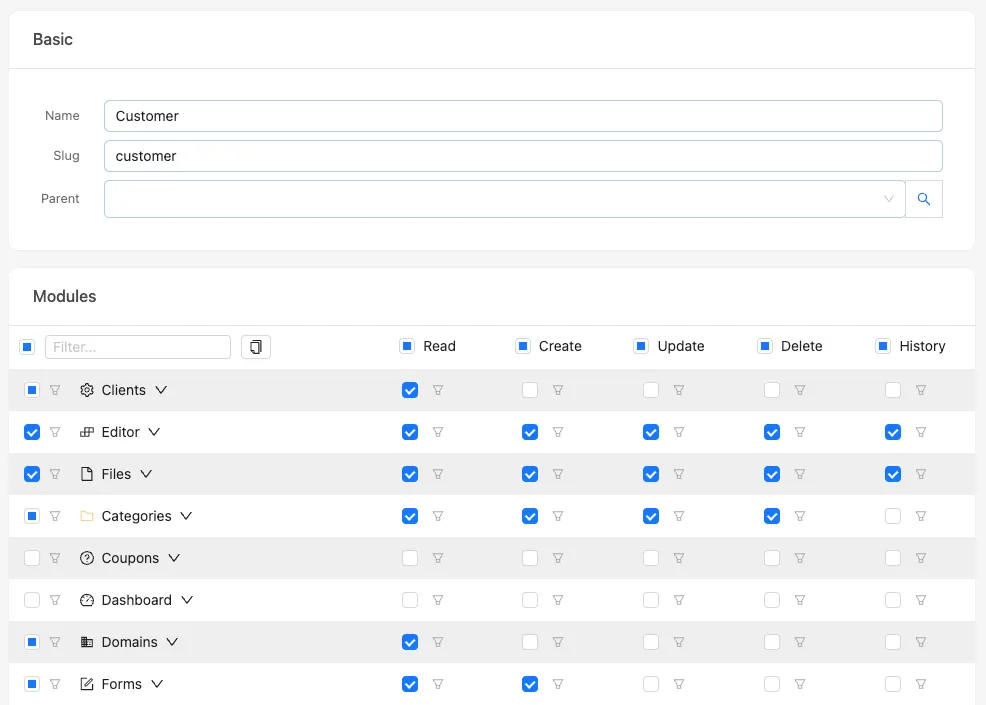
Section titled “Permissions in the Brezel UI”You can manage roles and permissions in the Brezel UI by navigating to the corresponding role module and editing the roles.
The UI will display a matrix of modules and operations, allowing you to set permissions per module or per operation.
When you are done, click the “Save” button to apply the changes. If you want to copy the permissions to your .bake configuration file, click the “Copy to clipboard” button.
It will copy the "modules" object to your clipboard, which you can paste into your .bake configuration file.